



In this blog, you will learn to troubleshoot kubernetes pods and debug issues associate with the containers inside the pods.
If you are trying to become a devops engineer with Kubernetes skills, it is essential to understand pod troubleshooting.
In most cases, you can get the pod error details by describing the pod event. With the error message, you can figure out the cause of the pod failure and rectify it.
How to Troubleshoot Pod Errors?
The first step in troubleshooting a pod is getting the status of the pod.
kubectl get podsThe following output shows the error states under the status.
➜  kubectl get pods
NAME                            READY   STATUS                       RESTARTS   AGE
config-service                  0/1     CreateContainerConfigError   0          20s
image-service-fdf74c785-9znfd   0/1     InvalidImageName             0          30s
secret-pod                      0/1     ContainerCreating            0          15s
Now that you know the error type, the next step is to describe the individual pod and browse through the events to pinpoint the reason that is causing the pod error.
For example,
kubectl describe pod config-serviceWhere config-service is the pod name. Now let’s look into detail on how to troubleshoot and debug different types of pod errors.
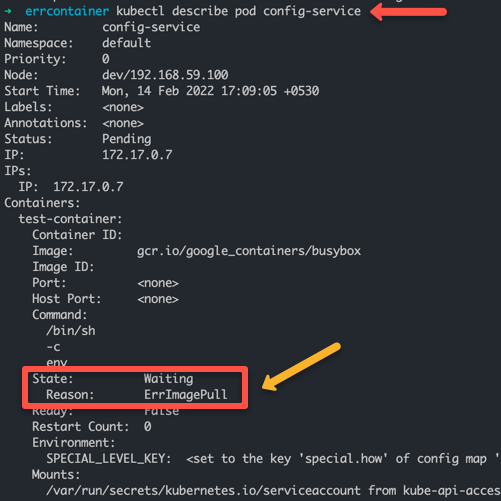
Types of Pod Errors
Before diving into pod debugging, it’s essential to understand different types of Pod errors.
Container & Image Errors
All these error states are part of the kubernetes container package & Kubernetes image package
Following is the list of official Kubernetes pod errors with error descriptions.
| Pod Error Type | Error Description |
|---|---|
ErrImagePull |
If kubernetes is not able to pull the image mentioned in the manifest. |
ErrImagePullBackOff |
Container image pull failed, kubelet is backing off image pull |
ErrInvalidImageName |
Indicates a wrong image name. |
ErrImageInspect |
Unable to inspect the image. |
ErrImageNeverPull |
Specified Image is absent on the node and PullPolicy is set to NeverPullImage |
ErrRegistryUnavailable |
HTTP error when trying to connect to the registry |
ErrContainerNotFound |
The specified container is either not present or not managed by the kubelet, within the declared pod. |
ErrRunInitContainer |
Container initialization failed. |
ErrRunContainer |
Pod’s containers don’t start successfully due to misconfiguration. |
ErrKillContainer |
None of the pod’s containers were killed successfully. |
ErrCrashLoopBackOff |
A container has terminated. The kubelet will not attempt to restart it. |
ErrVerifyNonRoot |
A container or image attempted to run with root privileges. |
ErrCreatePodSandbox |
Pod sandbox creation did not succeed. |
ErrConfigPodSandbox |
Pod sandbox configuration was not obtained. |
ErrKillPodSandbox |
A pod sandbox did not stop successfully. |
ErrSetupNetwork |
Network initialization failed. |
ErrTeardownNetwork |
Now let’s look at some of the most common pod errors and how to debug them.
Troubleshoot ErrImagePullBackOff
➜  pods kubectl get pods
NAME                                READY   STATUS             RESTARTS   AGE
nginx-deployment-599d6bdb7d-lh7d9   0/1     ImagePullBackOff   0          7m17s
If you see ErrImagePullBackOff in pod status, it is most likely for the following reasons.
- The specified image is not present in the registry.
- A typo in the image name or tag.
- Image pull access was denied from the given registry due to credential issues.
- The contianer image that you are trying to pull doesnt support the worker node architecture.
If you check the pod events, you will see the ErrImagePull error followed by ErrImagePullBackOff. This means the kubelet stops trying to pull the image again and again.
kubectl describe pod <pod-name>Error reference
Warning  Failed     24m (x4 over 25m)    kubelet            Error: ErrImagePull
  Normal   BackOff    23m (x6 over 25m)    kubelet            Back-off pulling image "ngasdinx:latest"
  Warning  Failed     29s (x110 over 25m)  kubelet            Error: ImagePullBackOff
Troubleshoot Error: InvalidImageName
➜  pods kubectl get pod
NAME                                READY   STATUS             RESTARTS   AGE
nginx-deployment-6f597fc4cd-j86mm   0/1     InvalidImageName   0          7m26s
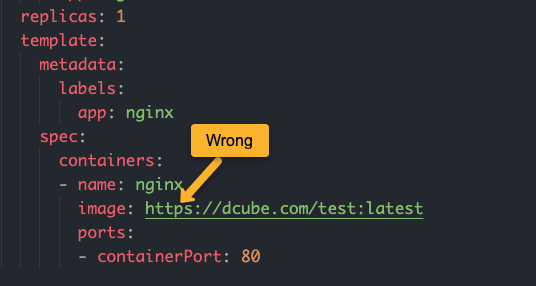
If you specify a wrong image URL in the manifest, you will get the InvalidImageName error.
For example, if you have a private container registry and you mention the image name with https, it will throw the InvalidImageName error. You need to specify the image name without https
If you have trailing slashes in the image name, you will get both InspectFailed & InvalidImageName errors. You can check it by describing the pod.
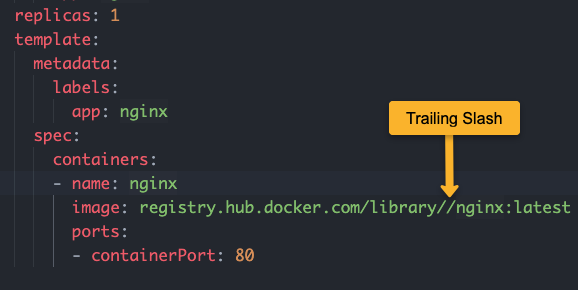
Error reference
Warning  InspectFailed  4s (x6 over 42s)  kubelet            Failed to apply default image tag "registry.hub.docker.com/library//nginx:latest": couldn't parse image reference "registry.hub.docker.com/library//nginx:latest": invalid reference format
  Warning  Failed         4s (x6 over 42s)  kubelet            Error: InvalidImageName
Troubleshoot RunContainerError
secret-pod 0/1 RunContainerError 0 (9s ago) 12sPod Configmap & Secret Errors [CreateContainerConfigError]
CreateContainerConfigError is one of the common errors related to Configmaps and Secrets in pods.
This normally occurs due to two reasons.
- You have the wrong configmap or secret keys referenced as environment variables
- The referenced configmap is not available
If you describe the pod you will see the following error.
Warning Failed 3s (x2 over 10s) kubelet Error: configmap "nginx-config" not foundIf you have a typo in the key name, you will see the following error in the pod events.
Warning Failed 2s kubelet Error: couldn't find key service-names in ConfigMap default/nginx-configTo rectify this issue,
- Ensure the config map is created.
- Ensure you have the correct configmap name & key name added to the env declaration.
Let’s look at the correct example. Here is a configmap where service-name is the key that is needed as an env variable inside the pod.
apiVersion: v1
kind: ConfigMap
metadata:
  name: nginx-config
  namespace: default
data:
  service-name: front-end-service
Here is the correct pod definition using the key (service-name) & configmap name (nginx-config)
apiVersion: v1
kind: Pod
metadata:
  name: config-service
spec:
  containers:
    - name: nginx
      image: nginx
      env:
        - name: SERVICE
          valueFrom:
            configMapKeyRef:
              name: nginx-config
              key: service-name
Pod Pending Error
To troubleshoot pod pending error, you need to be aware of Pod LifeCycle Phases. Pending in the first phase of the pod it means, the pod has been created but none of the main containers are running.
To understand the root cause, you can describe the pod and check the events.
For example,
kubectl describe pod <pod-name> -n <namespace>Here is an example, output of a pending pod that shows FailedScheduling due to no node availability. It could happen due to
Events:
  Type     Reason            Age                  From               Message
  ----     ------            ----                 ----               -------
  Warning  FailedScheduling  38s (x24 over 116m)  default-scheduler  no nodes available to schedule pods
It could happen due to
- Node Less CPU and Memory Resources
- No suitable node due to Affinity/Anti-affinity rules.
- Nodes could reject the pod due to Taints and Tolerations
- The node might not be ready to schedule the pods.
- The pod could not find the volume to be attached.
Nguồn: How To Troubleshoot Kubernetes Pods: Beginners Guide — DevOpsCube